Protecting backup infrastructure has become a critical part of cloud security. Attackers increasingly target backups because disabling retention, deleting vaults, or modifying policies can neutralize an organization’s recovery strategy before an attack is even launched. Azure Backup already includes safeguards like soft delete and immutable retention. But these controls still rely on the security posture of the subscription where the vault resides. If that subscription is compromised, an attacker may still be able to perform destructive operations. For example, compromised admin accounts or malicious actors can still attempt destructive operations such as purging recovery points or disabling the VM backup operation. Azure Resource Guard introduces a hardened and isolated approval boundary that enforces separation of duties for critical backup operations.
Ideally, the Azure Resource Guard is deployed in a separate tenant. In my environment, I don’t have a separate tenant so I deployed the Azure Resource Guard in a separate subscription that only a limited number of IT Security admins have access. The idea is to force IT Operations team to activate a multi-user approval process before they can perform critical backup operations such as deleting a VM backup.
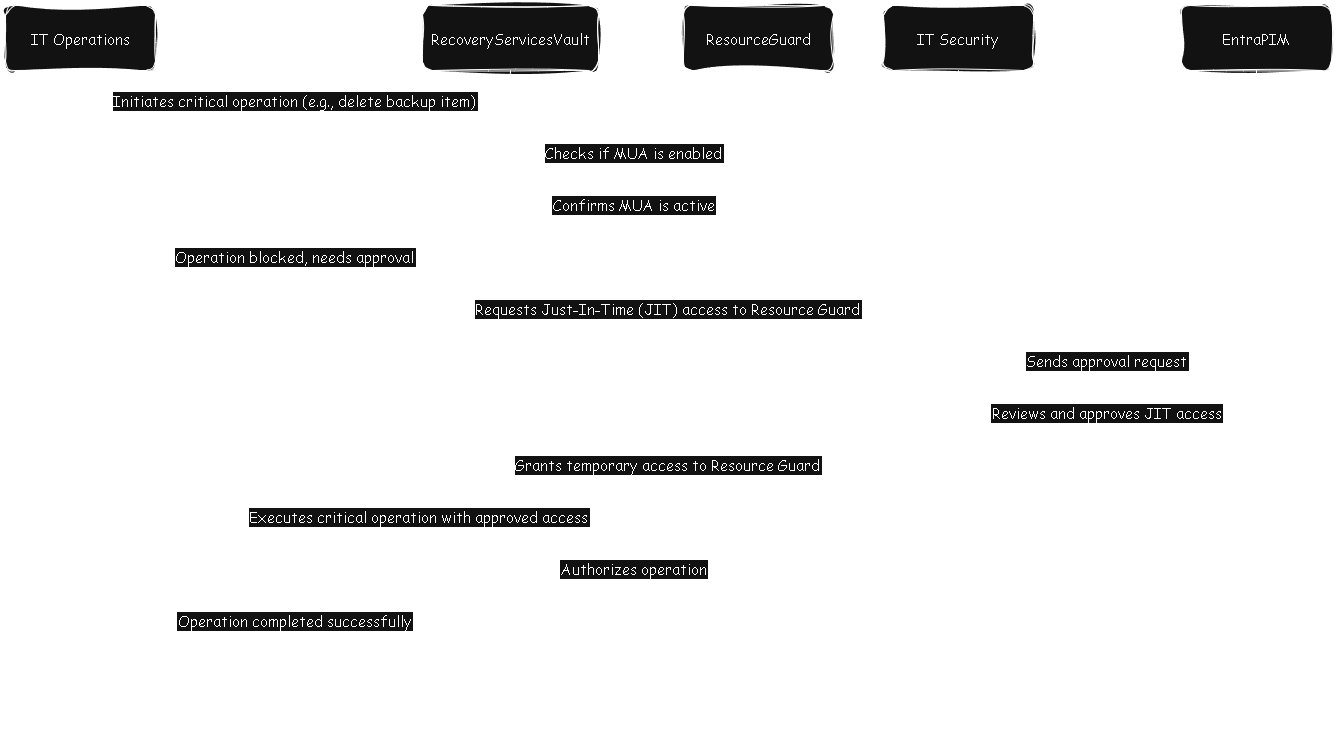
In a nutshell, if an IT Operations admin wants to perform critical changes i.e. delete a backup recovery point of a VM on the Recovery Services Vault, they’ll have to activate PIM (Privileged Identity Management) and an IT Security person will have to approve it. Once approved, the IT admin can perform the critical changes on the Recovery Services Vault. This prevents someone with Owner or Contributor role on the Recovery Services Vault from performing critical operations without approval and enforces a verification layer to protect from covert or malicious actions.
This approach assumes a clear separation of duties between IT Operations and IT Security. Specifically, that operational administrators do not hold the same level of privileged access as the security team. With that in mind, I’ll outline the high‑level configuration steps I used to implement this model. For the full, step‑by‑step procedure, I recommend referring to Microsoft’s official documentation, which already provides comprehensive and accurate guidance.
-
In a resource group in separate Azure subscription, I deployed the Azure Resource Guard (Contributor and above access limited to IT Security, and only Reader access for the IT Operations)
-
Create a separate security group and assign the Backup MUA Operator role for the Azure Resource Guard (or resource group). Ensure that this is an Eligible assignment instead of Active assignment, and assign the IT Security admins to be the PIM approvers for this role
-
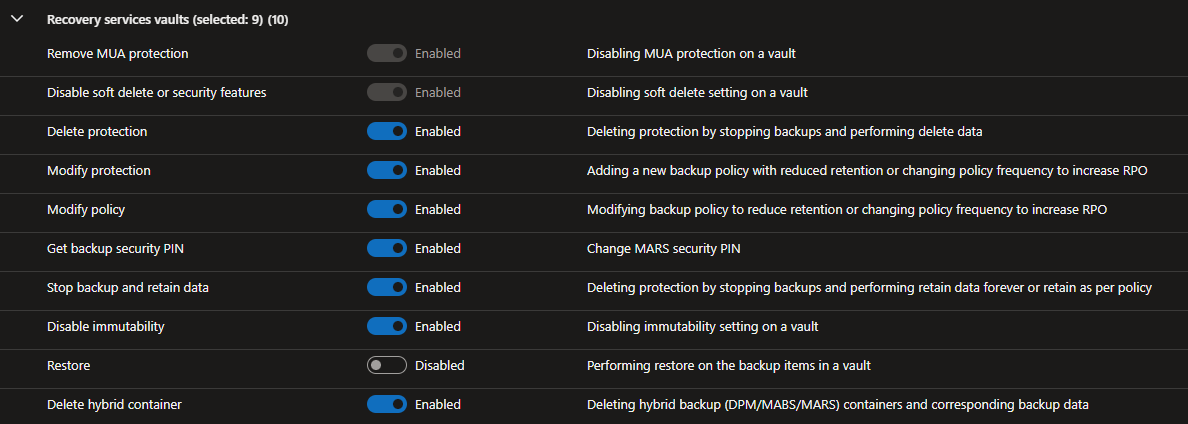
Configure the Resource Guard settings to restrict critical operations except for Restore operations
-
On the Azure Recovery Services vault hosting my backups, I enable Multi-User Authorization (MUA) and specify the reference to the Azure Resource Guard.
-
Now add the IT Operations admins into the MUA Operator security group created above
Now when someone performs one of the critical operations protected by the Azure Resource Guard, the IT Operations admin will first need to activate the Backup MUA Operator role. The PIM workflow then triggers an activation approval request, which requires an IT Security approver to explicitly approve or deny the elevation. Only after IT Security approves the request can the IT Operations admin proceed with the protected modification. This ensures that all high‑impact changes undergo a controlled, auditable approval process, preventing unauthorized or unmonitored actions (multi-user authorization). I hope this has been useful.